A little task: each new text line (Carriage Return/ if you press enter  ) in a Textarea should be an element on a list – so what’s the easiest way? Actual a basic element in the web and the user make aware distributions – so it would be fair to dignify it.
Little MVC Demo App:

We are going to analyze the input in this text field a little bit closer. In my option the “split” happens on the Server-Side but it’s also possible on JavaScript.
After you’ve klicked on “ok”:
The controller receives the text you’ve entered. After the user pressed “enter” in the Textarea either an \n or a \r\n as “functional character”. ( I think it’s in connection with the operation system…. But that’s another story ).
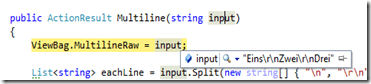
After that all we have to is to split the string on this sign and then we are able to take care about the single distributions:
  public ActionResult Multiline(string input)
        {
            ViewBag.MultilineRaw = input;

            List<string> eachLine = input.Split(new string[] { "\n", "\r\n" }, StringSplitOptions.RemoveEmptyEntries).ToList();
            ViewBag.MultilineSplitted = eachLine;

            return View("Index");
        }
View:
@using(Html.BeginForm("Multiline", "Home"))
{
    @Html.TextArea("input")
    <button>OK</button>
}
@if(string.IsNullOrWhiteSpace(ViewBag.MultilineRaw) == false)
{
<h2>Input</h2>
<p>Raw: @ViewBag.MultilineRaw</p>
<h3>Each Line</h3>
    <ul>
        @foreach(var line in @ViewBag.MultilineSplitted)
        {
        <li>@line</li>
        }
    </ul>
}
Result:
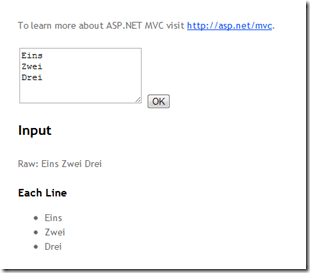
Not a big deal but maybe a help for some of you.